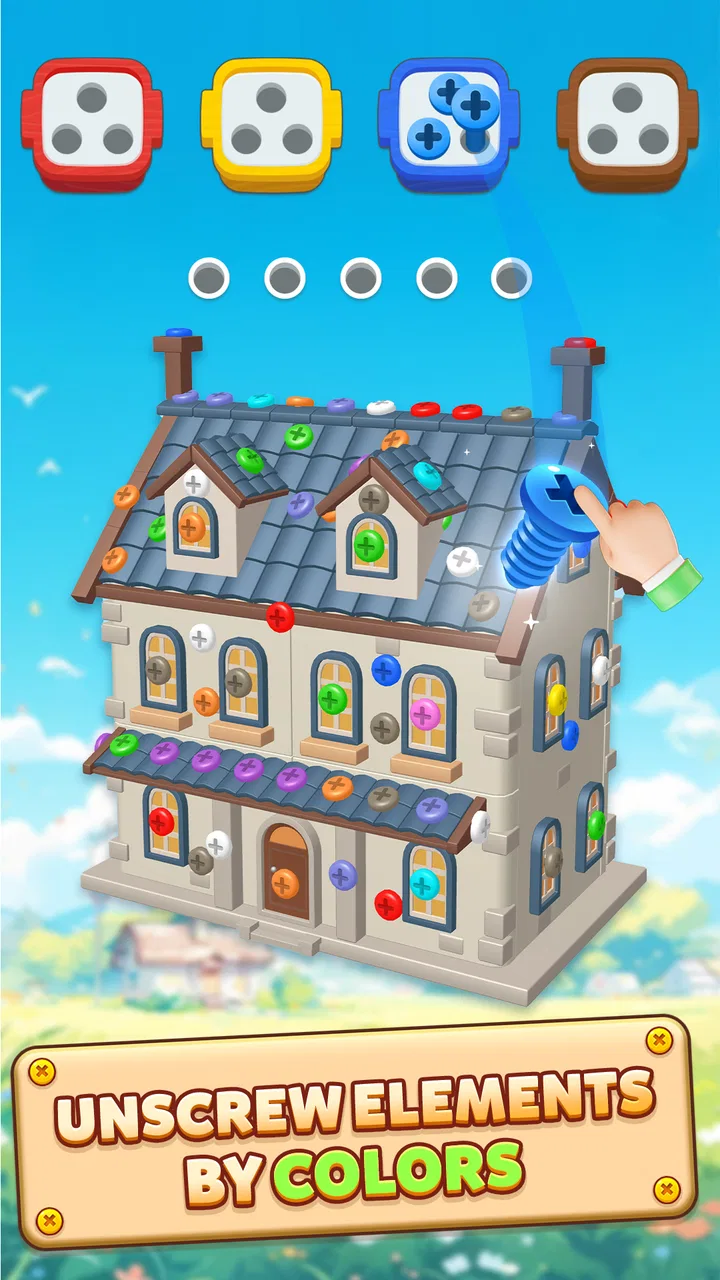
Screwdom 3D
- 4.6
- Rating
- 10.00M
- Installs
- Free
- Price

 Analysis by App-foxy
I found Screwdom 3D easy to understand within the first few moments: the board presents a three-dimensional arrangement of screws, and my job is to tap and move them away in a sensible order. That simple idea gives the game an immediately approachable feel, but the 3D presentation adds enough spatial thinking to keep it from feeling like a routine matching puzzle. I would describe it as a calm, tactile puzzle game for people who enjoy examining a shape, spotting the available move, and gradually clearing the structure.
It is a free puzzle game from iKame Games - Zego Studio, rated Everyone, and it has attracted a large audience on Android, with over ten million installs and an average rating of 4.6 from roughly 296 thousand ratings. Those figures suggest broad appeal, but they do not tell the whole story. In my experience, the more useful question is whether its visual layout, touch controls, and pace fit the way you prefer to play. That is where the game feels inviting for some players and less comfortable for others.
How clearly the board communicates what to do
The strongest part of the design is the basic visual conversation between the board and the player. Screws stand out as objects that can be selected, while the surrounding structure gives each move a clear spatial context. I never felt that I needed a long tutorial to understand the central action. The game’s concept is direct enough that a new player can begin experimenting almost immediately.
You May Also Like

 Blood Strike: 2.5 Anniversary
Blood Strike’s Loadouts Turn Every Drop Into a Tactical Gamble
A close look at Blood Strike’s custom loadouts: how fast access to signature weapons reshapes its battle royale rhythm, rewards preparation, and narrows the gap between fights.

 Pandora - Music & Podcasts
Pandora’s Music Is Easy to Start, but Harder to Recover
Pandora’s strength is its low-effort path from a seed to a station. Its weak spot is how much confidence it asks you to place in connection, setup, and quiet recovery.

 8 Ball Pool
 Is Built on Rivalries, Rematches, and Routine
A close look at the rivalries, rematches, shared routines, and unanswered safety questions that turn a quick pool match into a persistent mobile community.

 Samsung Music
’s Quiet Strength Is Playing What You Already Own
Its reach comes less from spectacle than from dependable access to a personal library. That simplicity is both the app’s strongest retention engine and its ceiling.

 AccuWeather: Weather Radar
AccuWeather Review: A Quick, Clear Forecast for Everyday Decisions
For everyday plans, the best forecast is the one you can understand quickly. AccuWeather makes rain timing, radar, and local conditions easy to act on, with a few trade-offs.

 Hill Climb Racing
Why Hill Climb Racing Still Turns Crashes Into One More Run
A tiny car, a bumpy hill and one more upgrade: Hill Climb Racing keeps resurfacing because its simple chaos makes every near-miss feel personal.
More From Our News Desk



That clarity matters for players who prefer low-friction games. There is no complicated character system or large collection of menus competing for attention. The focus stays on the puzzle in front of you. When I want something that can be opened and understood without remembering a long set of rules, this kind of presentation works well.
The 3D viewpoint is also part of the challenge. A screw that looks available from one angle may be connected to the surrounding arrangement in a way that becomes clearer only after studying the board. This encourages me to pause and inspect rather than tap randomly. The game therefore rewards visual scanning, not just quick reactions.
That same viewpoint can create a small readability hurdle. Three-dimensional objects overlap, and the most obvious screw is not always the most useful one to remove. Players who find depth, layered shapes, or busy visual scenes tiring may need more time per level. I would not call this a flaw in the concept, because the spatial arrangement is the point, but it does mean that the game is more demanding visually than a flat tile puzzle.
Navigation around the game feels best when I treat each board as a short visual investigation. I first look for screws that appear unobstructed, then consider whether removing one will expose a better route. That habit is more effective than tapping every visible object in sequence. It also makes the game feel more thoughtful without requiring complicated instructions.
A useful personal technique is to avoid committing to the first apparently easy move. I scan the whole arrangement, identify several possible starting points, and choose the one that seems likely to reveal the most space. This is a small change, but it reduces unnecessary mistakes and makes the puzzle easier to read. For players with attention difficulties, that deliberate scan can also turn a visually dense board into a series of smaller decisions.
The interface is most comfortable when I play with the phone held steadily and the screen viewed straight on. Tilting the device, playing in a cramped position, or trying to operate it while walking makes the 3D relationships harder to judge. That is not unusual for a spatial puzzle, but it is worth considering if you want a game designed for constant movement or one-handed play in every situation.
Touch control, pace, and different motor needs
The central control is tapping a screw and moving it away, so the game does not demand the rapid swipes, repeated button presses, or precise timing found in action games. That gives it a gentler motor profile. Someone who prefers deliberate touch interactions may find it more comfortable than a fast platformer or competitive puzzle game.
Even so, tapping a small object inside a layered 3D arrangement can require accuracy. When several screws sit close together, a player with reduced fine-motor control may occasionally select the wrong one. The challenge is not speed; it is placing a finger accurately on the intended target while keeping the board visually aligned.
I found that using the pad of my finger rather than the fingertip helped me stay relaxed, although it also made it more important to pause before touching. A stylus could potentially make small targets easier for some people, but I would treat that as a personal option rather than a guaranteed solution. The practical point is that this game favors controlled taps over hurried gestures.
The lack of reflex pressure is a meaningful strength. I can play at my own pace, inspect the structure, and think through a move without feeling that the game is demanding a fast response. That makes it suitable for a quiet break, a short rest between tasks, or a longer session when I want a puzzle that occupies my attention without becoming frantic.
On the sensory side, the main consideration is visual complexity. The screws, surfaces, shadows, and spatial layers need to be distinguished from one another. Players who are sensitive to crowded visuals may prefer shorter sessions, lower screen brightness, or a larger device where the arrangement is easier to inspect. I would also avoid judging the game in a bright, reflective environment, because glare can make small shapes and edges more difficult to separate.
Color perception may matter as well whenever the game uses visual differences to separate objects or indicate their state. I would not rely on color alone when solving a board; I pay attention to position, shape, and whether a screw is blocked or exposed. That approach is useful for anyone who finds subtle color changes difficult to read, though the game may still become less comfortable if important distinctions are visually similar.
Players who experience motion discomfort should pay attention to how the 3D board feels during interaction. A fixed, carefully viewed position is easier for me than repeatedly shifting the phone or trying to solve while the screen is moving in my peripheral vision. If the spatial presentation becomes tiring, shorter play periods are a sensible compromise rather than forcing a long session.
Where it fits into an ordinary day
One realistic use case is a ten-minute pause while waiting for an appointment. I can open the game, study one arrangement, and put the phone away without needing to remember a complicated story or coordinate with other players. That makes it more flexible than games that depend on a long uninterrupted session.
It also works well at home when I want something more engaging than passive scrolling. I can focus on one board, test a sequence, and feel that I have made progress through observation rather than speed. The game is particularly suitable for people who enjoy sorting, spatial organization, and the satisfaction of clearing a crowded object piece by piece.
However, the same qualities make it less suitable for certain situations. I would not choose it while walking, crossing a street, or doing another task that requires visual attention. The board needs inspection, and the wrong tap can interrupt the plan. It is also not the best choice when I need a game that can be played almost entirely by sound or by quick, familiar gestures.
For shared environments, the game has a quiet, individual character. It does not depend on conversation or competition, so it can be a good option when other people nearby are resting. On the other hand, it is not a substitute for a social puzzle experience. A person looking for cooperative play, discussion, or head-to-head pressure would likely be happier with a different category of game.
The Everyone age rating makes the premise broadly approachable, but age suitability is not the same as equal ease of use. A younger player may understand the tapping quickly yet still need help with planning several moves ahead. An older player may appreciate the calm pace but prefer a larger screen for examining the 3D structure. In both cases, the game’s accessibility depends as much on the device and playing environment as on the rules themselves.
What separates it from flatter puzzle alternatives
Compared with a standard match-three game, this feels less dependent on rapid pattern recognition and more dependent on spatial inspection. Match-three puzzles usually make the board readable as a flat grid, while this game asks me to understand depth and obstruction. If I enjoy rotating an object mentally or working out which part should be removed first, that difference is a genuine advantage.
Compared with a traditional jigsaw app, the satisfaction here comes from clearing a structure through individual decisions rather than assembling a picture from many fixed pieces. A jigsaw is often more about image recognition and patience; this game is more about access, order, and the consequences of each tap.
Compared with word puzzles, it avoids language as the main barrier. That can make it a better choice for someone who does not want vocabulary challenges or reading-heavy instructions. The trade-off is that the visual-spatial demand becomes more important. A player who finds text puzzles comfortable but 3D layouts confusing may prefer the word alternative.
Compared with fast arcade games, the lower pressure is the clearest difference. I do not need quick reactions to enjoy a board. Yet players who want constant movement, immediate rewards, or a strong sense of action may find the deliberate pace too restrained. The game’s appeal comes from careful progress, not adrenaline.
There is also a practical financial point. The game is free to download, while optional in-app purchases range from $0.99 to $99.99 per item. I would begin without spending anything and decide whether the core puzzle loop is enjoyable enough to justify optional purchases. Anyone who wants a completely purchase-free experience should pay attention to how the game presents its paid options and set a personal limit before playing.
Barriers that still deserve attention
The biggest remaining barrier is the combination of small touch targets and a three-dimensional board. This is manageable for me when I slow down, but it can become frustrating for someone with hand tremors, limited reach, or difficulty maintaining a steady touch. The game’s relaxed pace helps, yet it does not remove the need for accurate selection.
Another barrier is the dependence on visual separation. If a player cannot comfortably distinguish overlapping objects, shadows, or changes in position, the core puzzle may become difficult even though the rules are simple. I would recommend testing a few boards in a comfortable setting rather than assuming that an easy premise will automatically mean easy access.
The game can also be mentally tiring in a way that is easy to underestimate. Each move may be simple, but repeatedly checking which screw is exposed and what it will reveal requires sustained visual attention. For me, this is enjoyable in short sessions and less appealing when I am already tired. A player seeking a truly passive distraction may prefer a simpler idle game.
Device size changes the experience noticeably. On a larger screen, I can inspect the arrangement with less finger overlap. On a smaller phone, the same board may feel more cramped, particularly for players who enlarge interface elements elsewhere on their device. I would choose a stable surface and avoid playing one-handed if accuracy is a concern.
The current version is 10.0.19, and the game supports Android 7.0 or later. That makes it available to people using a range of older Android devices, although actual comfort will still depend on screen size, display quality, and touch responsiveness. A phone that technically runs the game may not provide the clearest or most comfortable view for every player.
I also think expectations matter. The developer, iKame Games - Zego Studio, has built the experience around a focused puzzle action rather than a broad accessibility toolkit. I would not approach it expecting extensive control customization or a fully hands-free way to play. Its inclusive qualities come mainly from the straightforward rules, unhurried interaction, and lack of language-heavy problem solving.
My inclusive verdict
I recommend Screwdom 3D to players who want a free, visually focused puzzle with a calm rhythm and a clear central action. Its strongest audience includes people who enjoy spatial reasoning, deliberate tapping, and short sessions that can fit around everyday routines. I especially like it for a quiet break when I want to concentrate on one contained problem instead of reacting to constant alerts or timers.
Its accessibility is practical rather than comprehensive. The simple rules, low reflex demand, and absence of complicated text make it approachable in several contexts. At the same time, the game still asks for accurate touch, comfortable visual focus, and the ability to interpret overlapping 3D objects. Those requirements are important enough that I would not recommend it automatically to someone who needs large targets, audio-first interaction, or minimal visual complexity.
If you are choosing between this and a flat puzzle, ask yourself what kind of effort feels enjoyable. Choose this game if examining depth and planning the order of removal sounds satisfying. Choose a match-three or word puzzle instead if you want larger, more immediately readable patterns or less spatial judgment. Choose an action game instead if your priority is speed and constant stimulation.
For my own use, the best approach is to play seated, keep the screen free from glare, inspect the whole arrangement before tapping, and stop when visual concentration starts to feel tiring. That small routine makes the experience more comfortable and also improves my decisions. I would start with the free version, avoid rushing into optional purchases, and see whether the 3D boards remain enjoyable over several sessions.
Overall, this is a thoughtfully approachable puzzle idea with real limits that are tied directly to its design. It does not try to be every kind of accessible game, but it offers a gentle alternative to reflex-heavy play and language-dependent puzzles. If your abilities and environment suit visual, controlled touch interaction, the relaxed pace and spatial problem solving are the reasons to give it a try.
FAQs for Screwdom 3D
01What is Screwdom 3D, and how does it work?
Screwdom 3D is a captivating puzzle game available on both Android and iOS platforms. The game challenges players to solve intricate puzzles by maneuvering screws and bolts into their correct positions. With intuitive controls and vibrant 3D graphics, users must think strategically to progress through increasingly difficult levels. It's perfect for those who enjoy mental challenges and problem-solving.
02Is Screwdom 3D free to play, or does it have in-app purchases?
Screwdom 3D is free to download and play, offering a wide range of levels without any initial cost. However, it does include optional in-app purchases. These purchases can help players unlock additional features, hints, or remove ads, enhancing the overall gaming experience. Such options are entirely optional and do not affect the core gameplay.
03What are the system requirements for Screwdom 3D on mobile devices?
To enjoy Screwdom 3D, Android users should have a device running Android 5.0 or later, while iOS users need a device with iOS 10.0 or later. The app is optimized for both smartphones and tablets, ensuring smooth performance and vibrant visuals across different screen sizes. A stable internet connection is recommended for updates and in-app features.
04Are there any ads in Screwdom 3D, and how can they be managed?
Screwdom 3D contains ads, which help keep the game free to play. These ads typically appear between levels or during gameplay breaks. If users find the ads disruptive, they have the option to remove them via a one-time in-app purchase. This allows for an uninterrupted gaming experience, letting players focus solely on solving puzzles.
05How does Screwdom 3D ensure user privacy and data security?
Screwdom 3D adheres to strict privacy guidelines to protect user data. The app collects minimal information necessary for gameplay and performance improvements. Users are encouraged to review the privacy policy available within the app to understand what data is collected and how it is used. Ensuring user security is a top priority for the developers.
Pros
- Intuitive controls enhance gameplay experience.
- Vivid graphics make for an engaging visual.
- Levels offer a satisfying challenge progression.
- Minimal ads ensure uninterrupted playtime.
- Frequent updates keep content fresh and exciting.
Cons
- Limited customization options for characters.
- Occasional lag on older devices.
- In-app purchases can be pricey.
- No offline mode limits accessibility.
- Repetitive background music may annoy some users.

Screwdom 3D
Gallery